
Restaurant Management System in Pakistan
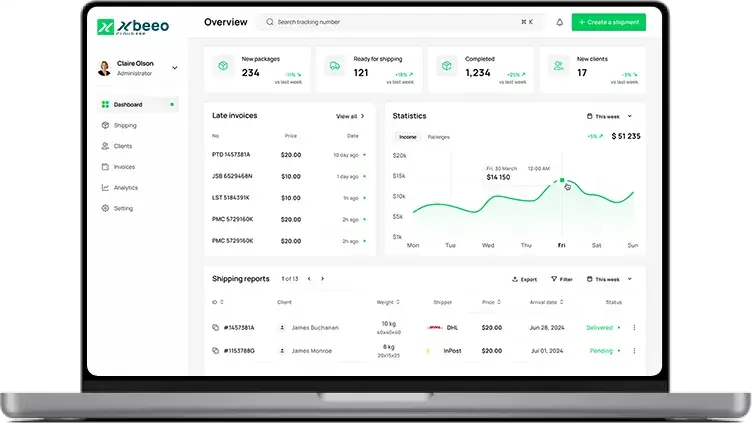
Manage menu items, table orders, kitchen activity, billing, and inventory usage through the Best Cloud Based Restaurant Management System in Pakistan designed to support daily restaurant operations across dine-in, takeaway, and delivery channels.
- Home
- Restaurant Management System
Order & Kitchen Control
Organize Your Daily Restaurant Workflow
XBEEO’s Cloud Based Restaurant Management System keeps menu details, order tickets, kitchen updates, and billing records in one controlled workflow. Staff can follow order movement from entry to service without relying on manual notes or separate tools.
-
Menu & Item Management
-
Table, Counter & Delivery Orders
-
Kitchen Order Ticket (KOT) Tracking
Step-by-Step Approach
A Structured Flow for Restaurant Operations
XBEEO cloud based Restaurant Management System supports restaurant activity through a defined sequence that keeps order handling and production steps consistent.
Scalable Restaurant Control
Support for Single and Multi-Branch Food Operations
As #1 cloud based ERP system provider in Pakistan, XBEEO’s cloud based restaurant management system organizes menu items, order entries, and stock movement under structured system rules.
-
Consistent Order Records Each order follows a uniform entry format for accurate service and billing.
-
Shared Visibility Across Teams Front desk, service staff, kitchen teams, and management work from the same operational data.
-
Reduced Manual Tracking System-based KOTs and stock usage entries limit handwritten slips and repeated checks.
Why Our ERP System
How XBEEO Supports Food Service Operations Across Sectors
XBEEO’s cloud based restaurant module supports different formats within the food industry.
Powerful Restaurant Features
Maintain Structure Across Ordering and Kitchen Processes
XBEEO’s Cloud Based Restaurant Management System keeps order handling and kitchen operations organized.
-
KOT & Order Progress Tracking
-
Menu, Modifier & Pricing Management
-
Daily Sales & Consumption Reporting

Comprehensive ERP Features
One System for Daily Restaurant Administration
XBEEO supports order entry, production control, billing, and inventory tracking through one coordinated system.
-
Maintain Accurate Order and Sales Records
-
Track Ingredient Usage Across Items
-
Reduce Manual Order Handling
Successful Implementations
Data Sync Speed
System Uptime
Customizable ERP Modules
Restaurant Management System in Pakistan for Better Control of Dining and Takeaway Operations
A customer sees a menu, chooses a meal, and waits for the order. Behind that simple experience, restaurant staff handle table assignments, order changes, kitchen requests, stock levels, payments, and daily accounts. When these tasks depend on handwritten notes and separate records, a small mistake at the counter can affect the entire service.
XBEEO brings restaurant sales and business administration together through its restaurant management system in Pakistan. Our Retail POS supports restaurant and café operations, including order management, table tracking, and billing. The wider XBEEO system adds inventory, procurement, accounting, and reporting capabilities for the business behind the counter.
A family restaurant does not handle customers like a takeaway counter or a café. We begin by understanding how your staff take orders, serve tables, purchase supplies, manage outlets, and close daily accounts. That gives us a clear basis for selecting the right XBEEO modules for your business.
A Full Dining Room Puts Every Small Process Under Pressure
One table asks for another round of drinks while a family changes part of its order. A takeaway customer is waiting at the counter, and the kitchen is already preparing several meals. Restaurant staff need accurate order details because confusion between tables, items, and bills affects both service and customer trust.
Restaurant businesses across Pakistan follow many formats. Traditional restaurants handle family dining, fast-food outlets serve counter orders, cafés combine drinks with light meals, and larger brands operate several branches. Each format has a different service routine, menu structure, and way of handling payments.
The dining area depends on clear communication with the counter and kitchen. A wrong table number, an omitted item, or an unclear change request creates extra work for staff. A POS record gives the team a clear reference for the items ordered and the table associated with the transaction.
Food purchasing adds pressure outside customer service. Fresh produce, meat, dairy products, spices, cooking oil, drinks, and packaging arrive from different suppliers. The restaurant must keep track of what it buys and what remains available, especially when popular dishes depend on a small number of essential ingredients.
Owners also deal with daily collections, supplier payments, staff expenses, rent, utilities, and branch performance. Sales alone do not explain how well a restaurant is doing. XBEEO brings sales, purchasing, inventory, accounting, and reporting into the wider business picture so owners have more than a cash total to work with.
The Journey From Table Number to Final Receipt
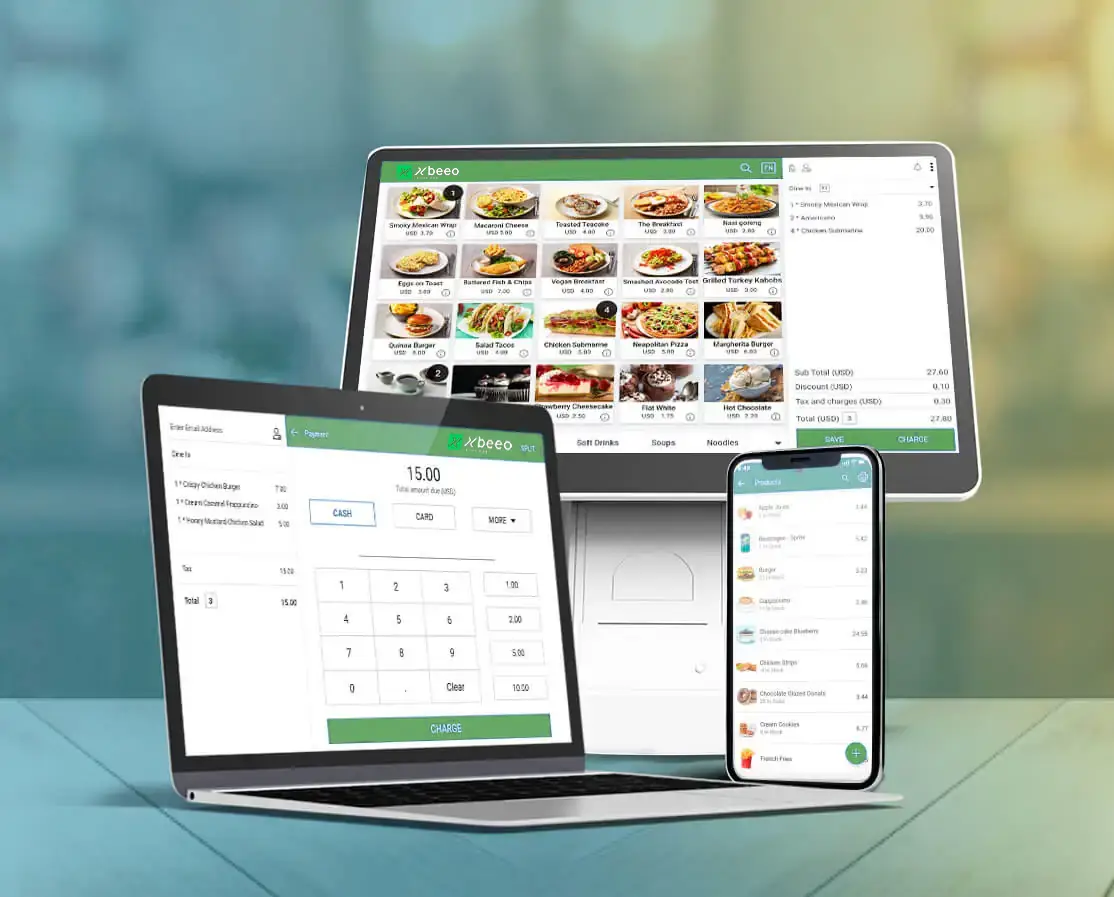
Dine-in service starts with a table and an order. Takeaway service starts at the counter. Both require staff to record the right items, quantities, and customer details before the kitchen begins preparation. XBEEO Retail POS supports restaurant order management, giving staff a digital record of customer transactions.
Table tracking helps servers keep orders associated with the correct dining space. When several families are eating at once, the cashier needs to identify which items belong to each table. XBEEO lists table tracking among its restaurant and café POS capabilities.
Real restaurant orders often change after the first request. A guest removes a dish, adds another drink, or asks for a different quantity. During system selection, test how staff record edits, cancelled items, special requests, and price changes. These details need a clear process rather than verbal instructions passed between employees.
The kitchen also needs accurate order information. Servers and counter staff must communicate requested items and changes without mixing one customer’s meal with another. XBEEO’s POS supports order management, while the exact method for sending orders to kitchen printers or display screens needs to be confirmed during system configuration.
Billing brings the transaction together. The cashier needs to check the ordered items, apply the restaurant’s approved charges, and issue the customer’s bill. XBEEO Retail POS supports billing and customizable billing options. Your team can use real examples to confirm the required treatment of discounts, service charges, separate payments, and refunds.
Once a sale is recorded, it becomes part of the restaurant’s business information. XBEEO’s POS supports sales tracking and inventory synchronization, while its wider ERP modules support purchasing, accounting, and reporting. This gives owners a way to connect customer transactions with the records used to manage the business.
The Store Room Behind Every Dish
A restaurant’s stockroom holds much more than finished products. Meat, rice, flour, vegetables, sauces, drinks, cooking oil, spices, and disposable packaging all need proper records. XBEEO Inventory Management lets businesses organize products into categories and track stock across configured locations.
Product records need to reflect the way the restaurant purchases and stores items. A team may buy vegetables by weight, drinks by carton, and cleaning supplies by individual unit. Clear product names and units help staff record incoming supplies without confusing quantities or creating duplicate entries.
Supplier information belongs alongside purchasing records. Restaurants often deal with separate vendors for meat, fresh produce, dairy, beverages, and dry goods. XBEEO Procurement and Supply supports supplier management and automated purchase orders, helping purchasing staff maintain a record of their suppliers and orders.
Receiving supplies is another point where errors enter the stock record. Staff need to compare delivered quantities with the purchase order and record what actually arrived. A clear receiving procedure keeps inventory figures closer to the physical stock held by the restaurant.
Sales also affect stock. When an order is completed through the POS, XBEEO Inventory Management supports sales and inventory synchronization, with stock updated after each transaction. This reduces the need to maintain a separate sales total and then manually reconcile every corresponding stock entry.
A restaurant group with several branches has another concern: knowing where its supplies are held. A central store, a main kitchen, and individual outlets need clearly identified stock locations. XBEEO’s inventory capabilities support stock locations, while its Retail POS supports multi-store management for businesses with several outlets.
Food wastage and recipe costing deserve a separate demonstration. Restaurant owners often need to know how much of an ingredient goes into a dish, how portions affect cost, and how spoiled or damaged stock is recorded. These are specific requirements. We identify them during planning and confirm the exact configuration or additional integration needed rather than treating them as automatic POS features.
The Numbers Behind a Busy Restaurant
A full dining room can produce strong sales while the business still struggles with rising expenses. Food purchases, staff costs, rent, utilities, packaging, discounts, and other expenses all affect what remains after the bills are paid. Owners need reliable financial records to understand the difference between money collected and business performance.
Sales records give managers a starting point. XBEEO Retail POS supports transaction tracking, while Analytics and Reports provides retail performance information such as daily sales, stock turnover, and customer trends. These reports help owners examine business activity beyond the closing cash figure.
Menu performance is another useful area to examine. Restaurant managers often compare the dishes customers order most, the products that sell slowly, and the items that need a price review. During setup, define the product and sales reports your team needs and confirm which details the selected reporting configuration provides.
Supplier purchases form a major part of restaurant spending. XBEEO Procurement and Supply maintains supplier information and purchase orders, while inventory records track stock and related movements. These records help accounts staff examine purchasing activity alongside the supplies received by the restaurant.
Accounting connects the sales and purchasing sides with the restaurant’s financial records. XBEEO Accounting and Finance supports invoicing, financial reporting, expense tracking, and budgeting. The restaurant can define how its POS sales, supplier invoices, payments, and other transactions enter its accounting process.
Staff costs also affect the final result. Chefs, servers, cashiers, cleaners, supervisors, and managers all contribute to daily service. Restaurant owners need organized employee and payroll records alongside their sales and expense information when reviewing the full cost of running an outlet.
The end-of-day routine deserves its own attention. Managers need a clear way to compare recorded sales with cash received, card settlements, refunds, discounts, and other adjustments. We include these requirements in the POS and accounting review so the restaurant knows exactly which reconciliation steps the selected setup supports.
One POS Setup, Different Kinds of Food Businesses
A restaurant system must fit the way customers order and receive their food. Table service, counter sales, takeaway orders, and multi-branch operations create different demands. XBEEO’s Retail POS lists restaurants and cafés among its use cases, with order management, billing, and table tracking.
Family Dining and Full-Service Restaurants
Family restaurants handle larger tables, shared meals, repeat orders, and bills that often involve several guests. Servers need to keep the order linked to the correct table, while cashiers need a clear transaction record before issuing the final bill. XBEEO Retail POS supports table tracking and restaurant order management.
Fast-Food Counters and Takeaway Businesses
Fast-food outlets handle a steady flow of counter orders, quick payments, and packaged meals. Their staff need accurate product selection and a straightforward checkout process. XBEEO Retail POS supports billing, sales tracking, and inventory synchronization for these sales activities.
Cafés, Dessert Shops, and Coffee Houses
Cafés sell a mix of prepared food, drinks, desserts, and packaged products. Their managers handle several product categories, supplier purchases, counter sales, and stock records. XBEEO’s POS, inventory, procurement, and reporting capabilities support these business activities within the wider ERP setup.
Restaurant Groups and Multi-Branch Brands
Restaurant groups need to compare outlet activity and maintain business records across locations. XBEEO Retail POS supports multi-store management, while inventory management and reporting provide additional information for purchasing and business review. The selected configuration defines how each branch records its own sales and stock.
The same configuration does not suit every food business. We look at service style, outlet count, product range, purchasing arrangements, and reporting needs before defining the system. This keeps the project tied to the restaurant’s actual way of working.
Running Several Outlets Without Losing the Full Picture
Owners of multi-branch restaurants need a view of the whole business, not just the outlet they visit most often. They want to compare sales, examine stock records, review purchasing, and understand which locations require attention. XBEEO provides a cloud-based ERP environment for connected business functions across configured locations.
Retail POS supports multi-store management, allowing businesses to manage sales information across their branches through a shared setup. This gives management a central point for reviewing outlet transactions instead of collecting separate sales summaries from every cashier.
Stock needs its own location structure. A restaurant group may purchase supplies centrally and distribute them among branches, or each outlet may handle some purchases independently. XBEEO Inventory Management supports stock locations, so the restaurant can define how products are organized across its stores.
Purchasing records help explain differences between branches. One outlet may purchase fresh supplies locally, while another receives products through a central purchasing team. XBEEO Procurement and Supply supports supplier records and purchase orders, giving management a more organized record of purchasing activity.
Access responsibilities differ by job. A cashier handles customer transactions, a storekeeper maintains stock records, and an owner reviews sales and financial information. We discuss these roles when planning the system so employees have access to the functions required for their work.
Reliable branch reporting also depends on consistent data entry. Outlets need common product names, clear billing procedures, and agreed rules for recording returns and stock changes. Without these basics, management cannot make a fair comparison between two locations.
Cloud access gives authorized users a shared way to work with the selected business modules. XBEEO’s cloud ERP brings supported functions such as POS, inventory, procurement, finance, and analytics into one business environment. We define the location setup, access requirements, and reporting needs before deployment.
Questions Worth Asking Before You Buy Restaurant Software
A software demonstration often looks simple because the provider controls the example. Your restaurant needs something more practical. Bring a real menu, an actual table layout, and a few common customer orders. Ask the provider to show how the system handles the same steps your staff perform during service.
Start with the cashier’s routine. Ask the provider to open a table, enter several items, add another order, make a change, and prepare the final bill. This will show whether staff can follow the process without losing track of the customer or the transaction.
Next, examine the connection with stock. Choose a few popular dishes and identify the ingredients the restaurant purchases. Ask how the POS sale updates inventory, how staff record incoming supplies, and how the system displays available quantities. Do not assume recipe-level deductions without seeing them demonstrated.
The accounts team needs a different demonstration. Review the sale records, purchasing entries, expenses, and reports that feed the restaurant’s financial review. Ask which details appear automatically and which require an employee to enter or reconcile them.
The final discussion should cover the equipment and services around the software. Confirm POS hardware, printers, payment methods, internet requirements, delivery-platform connections, staff training, and technical support. These details affect the actual cost and day-to-day use of the system.
Use this checklist during provider demonstrations:
- Table and order handling: Ask the provider to demonstrate table assignment, active orders, added items, and the process for changing or cancelling an order.
- Bill controls: Check the treatment of discounts, service charges, tax entries, separate payments, refunds, and printed receipts.
- Menu and product setup: Review how staff select products, update prices, manage categories, and handle items that are temporarily unavailable.
- Stock updates: Test a POS sale and inspect the resulting inventory record. Ask how purchases, returns, damage, and stock adjustments are entered.
- Supplier purchasing: Review supplier records, purchase orders, incoming quantities, and the information shared with inventory.
- Branch-level records: Ask how the system separates outlets, handles staff access, and lets management compare sales and stock information.
- Technical setup: Confirm hardware needs, printer support, internet requirements, data preparation, staff training, support arrangements, and total cost.
A provider earns your confidence by showing the actual process, not by presenting a long feature list. We encourage restaurant owners to test XBEEO against their own table service, counter sales, purchasing, and reporting needs before agreeing on the project scope.
What Owners Need From the System After the Opening Rush
A POS system must make sense to the person using it during a busy service. Cashiers need clear product selection and billing steps, while servers need to identify tables and their orders. A complicated screen slows staff down, so usability deserves a proper test before the restaurant chooses its setup.
Menu changes also need a simple process. Restaurants introduce new dishes, change prices, remove seasonal items, and run promotions. Staff must know who can make these changes and how updates reach the relevant outlets. We include menu maintenance and user responsibilities in the setup discussion.
A clear order record helps when a customer asks about a missing item or a changed bill. The cashier and manager need to find the transaction and understand what was recorded. XBEEO Retail POS provides order management and billing, while the restaurant must confirm the specific order-edit and audit details during the demonstration.
Inventory information becomes useful when it reflects actual purchases and sales. A manager who sees low stock can discuss replenishment with the purchasing team before the next service. XBEEO supports sales and inventory synchronization, real-time stock tracking, and automated reordering through its relevant modules.
Purchasing and accounting records add context to the sales figures. Owners need to compare what the restaurant sold with what it bought and what it spent. XBEEO connects POS with procurement, inventory, and accounting capabilities, giving management a broader record of these transactions.
Reports should answer questions that restaurant owners ask regularly. Which outlet made more sales? How did stock move? What did the restaurant purchase? Which expenses need review? XBEEO Analytics and Reports provides customizable dashboards, performance tracking, and automated reporting for connected business information.
A useful system is one staff members keep using correctly. That depends on a setup that matches the restaurant, clear job responsibilities, and proper training. Our team focuses on the selected XBEEO modules and the business processes the restaurant needs to manage, rather than adding functions that do not serve its daily work.
Bringing a Restaurant’s Daily Routine Into the System
We start by learning how the restaurant takes orders and serves customers. This includes table service, counter sales, takeaway orders, branch arrangements, billing rules, and the staff responsible for each task. The assessment gives us a clear view of the work the system needs to support.
Next, we organize the products and menu information used at the POS. Product names, categories, prices, and billing details are reviewed before configuration. The restaurant also identifies how it handles discounts, service charges, refunds, and changes to customer bills.
Inventory preparation follows the product review. We organize stock categories, units, locations, supplier details, and opening quantities. The restaurant’s team confirms the actual stock figures so the system begins with records that match the supplies on hand.
POS configuration then follows the service arrangement. We review table tracking, outlet details, billing options, and user responsibilities. Where the business uses several branches, the setup also defines how each location records sales and maintains its own operating information.
The selected ERP modules are then linked with the wider business requirements. Inventory supports stock records, procurement maintains supplier and purchase information, accounting handles financial records, and analytics supports management reporting. The scope defines which connections are included in the implementation.
Before the system goes into regular use, staff test familiar transactions. They enter a dine-in order, process a takeaway sale, print a bill, review a stock update, record a purchase, and examine the resulting reports. This exercise helps the team catch setup issues before customers depend on the new process.
Training prepares employees for their assigned work. Cashiers practise billing, managers review sales information, storekeepers maintain stock records, and purchasing and accounts staff use their relevant modules. XBEEO supports the agreed implementation through requirements assessment, configuration, data preparation, testing, and user training.
Plan Your Restaurant Setup With XBEEO
Good restaurant management depends on more than serving meals quickly. Order records, accurate bills, stock purchases, supplier information, and financial reports all affect how well the business runs. XBEEO brings restaurant-focused POS capabilities together with ERP modules that support these important business functions.
Tell our team how your restaurant works, how many outlets you operate, what your staff need at the counter, and how you manage food supplies and accounts. We will review these details and identify the relevant XBEEO modules and configuration requirements.
Contact XBEEO to discuss your restaurant POS software Pakistan requirements. Bring your menu, current billing process, and stock arrangements into the discussion. Our team will help you plan a system that fits the way your restaurant serves customers.
Frequently Asked Questions
Does XBEEO support dine-in restaurants with table service?
Yes. XBEEO identifies restaurants and cafés as supported Retail POS use cases. Its published restaurant POS capabilities include order management, table tracking, and billing. The setup can be reviewed against your table arrangement and service process.
Can the same restaurant system handle takeaway sales?
XBEEO Retail POS supports sales and billing, making it relevant to counter-based restaurant transactions as well as dine-in service. During setup, we review how your takeaway orders are entered, billed, and recorded alongside other sales.
Does a POS sale automatically update restaurant inventory?
XBEEO Inventory Management supports synchronization between sales and stock, with inventory updated after each transaction. This connects POS activity with stock records. Recipe-based deductions for individual ingredients require a separate demonstration and confirmation of the agreed configuration.
Can I manage more than one restaurant branch through XBEEO?
XBEEO Retail POS supports multi-store management, and its inventory module supports stock locations. These functions help restaurants maintain sales and stock records across configured outlets. The project scope defines how each branch handles its own transactions and purchasing information.
Does XBEEO provide accounting and sales reports for restaurant owners?
Yes. XBEEO offers Accounting and Finance for financial records and reporting, along with Analytics and Reports for dashboards, retail performance tracking, and automated reports. These modules help management review sales, expenses, purchasing, inventory, and other connected business information.
What should I prepare before contacting XBEEO about restaurant software?
Prepare your menu or product list, number of outlets, table arrangement, billing requirements, supplier details, stock categories, and the reports you use to review business performance. This information helps our team understand your restaurant and define the POS and ERP configuration required for implementation.

Get started
Ready to Manage Your Restaurant More Efficiently?
Track orders, support kitchen activity, and maintain daily sales with XBEEO’s Cloud-Based Restaurant Management System.